




Engineer. Problem-Solver. Builder.

I'm Maxwell Tobin, a senior at Duke University from Franklin, MA, studying Electrical & Computer Engineering with a minor in Financial Economics. Through my coursework and projects, I've developed a strong interest in designing, building, and testing systems that bring hardware and software together. My experience and interests span systems and test engineering, product development, FPGA and CPU design, full-custom CMOS ASIC design, autonomous robotics, and energy systems. I enjoy turning what I learn in the classroom into working prototypes, working through technical challenges, and collaborating with others to build reliable engineering solutions.

MT
HEADSHOT — add images/headshot.jpg
Maxwell Tobin

Projects

Hydropod portable hydroelectric charger cover showing a forest stream
Sep 2026 — Present

Hydropod — Portable Hydroelectric Generator

Altium DesignerEmbedded SystemsI2CProduct Design
ASIC physical layout showing circuit cells and multicolored interconnect layers
Aug 2026 — Present

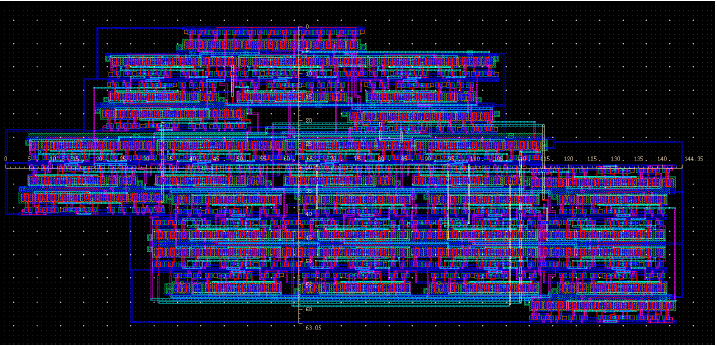
Matrix-Multiplication Accelerator with Banked SRAM

ASICFull-CustomCMOSSRAM
Tic-Tac-Toe arcade cabinet
Jan 2026 — Apr 2026

FPGA 5-Stage Pipelined Processor with Tic-Tac-Toe AI

FPGAVerilogDigital Design
→
Conventional MOSFET and NC-FET cross sections showing the ferroelectric gate layer, with comparative current–voltage curves
Feb 2026 — Apr 2026

Performance and Analysis of Negative-Capacitance FETs

SemiconductorsNC-FETDevice Physics
Complete 16-bit RISC processor datapath
Mar 2025 — Apr 2025

16-Bit Single-Cycle RISC CPU

Computer ArchitectureDigital LogicLogisim
→
HondaJetConfidential
May 2025 — Aug 2025

Automated Landing Gear Sensing System

AerospaceMechatronicsAutomationSensorsHIL
→
HondaJet EchelonConfidential
May 2025 — Aug 2025

Nose Wheel Steering Hardware Simulation

ControlsElectrical DesignAerospaceSimulinkHIL
→
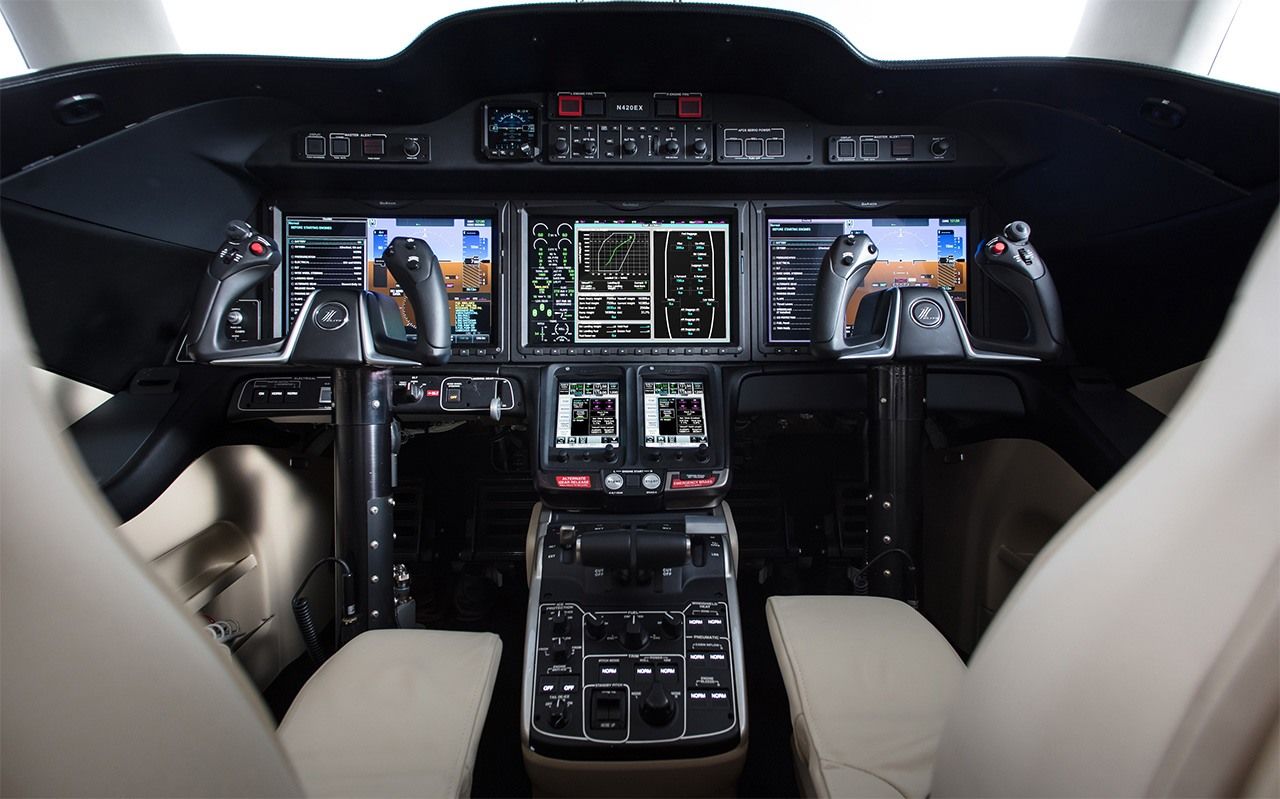
HondaJet cockpitConfidential
May 2025 — Aug 2025

Cockpit Panel Design

CATIA3D PrintingCost Optimization
→
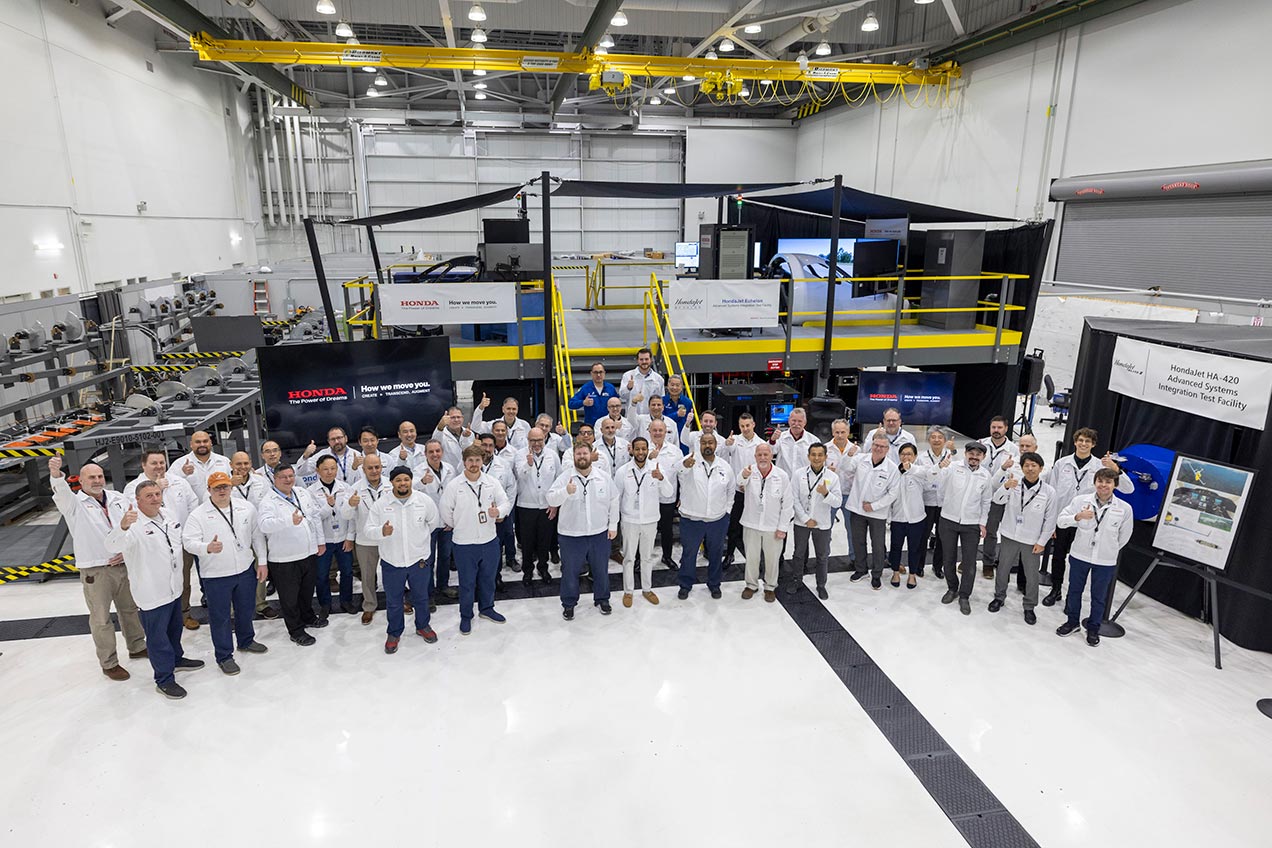
HondaJet integration test facilityConfidential
May 2025 — Aug 2025

External Lighting Visualization Panel

SchematicsIntegrationCATIA
→
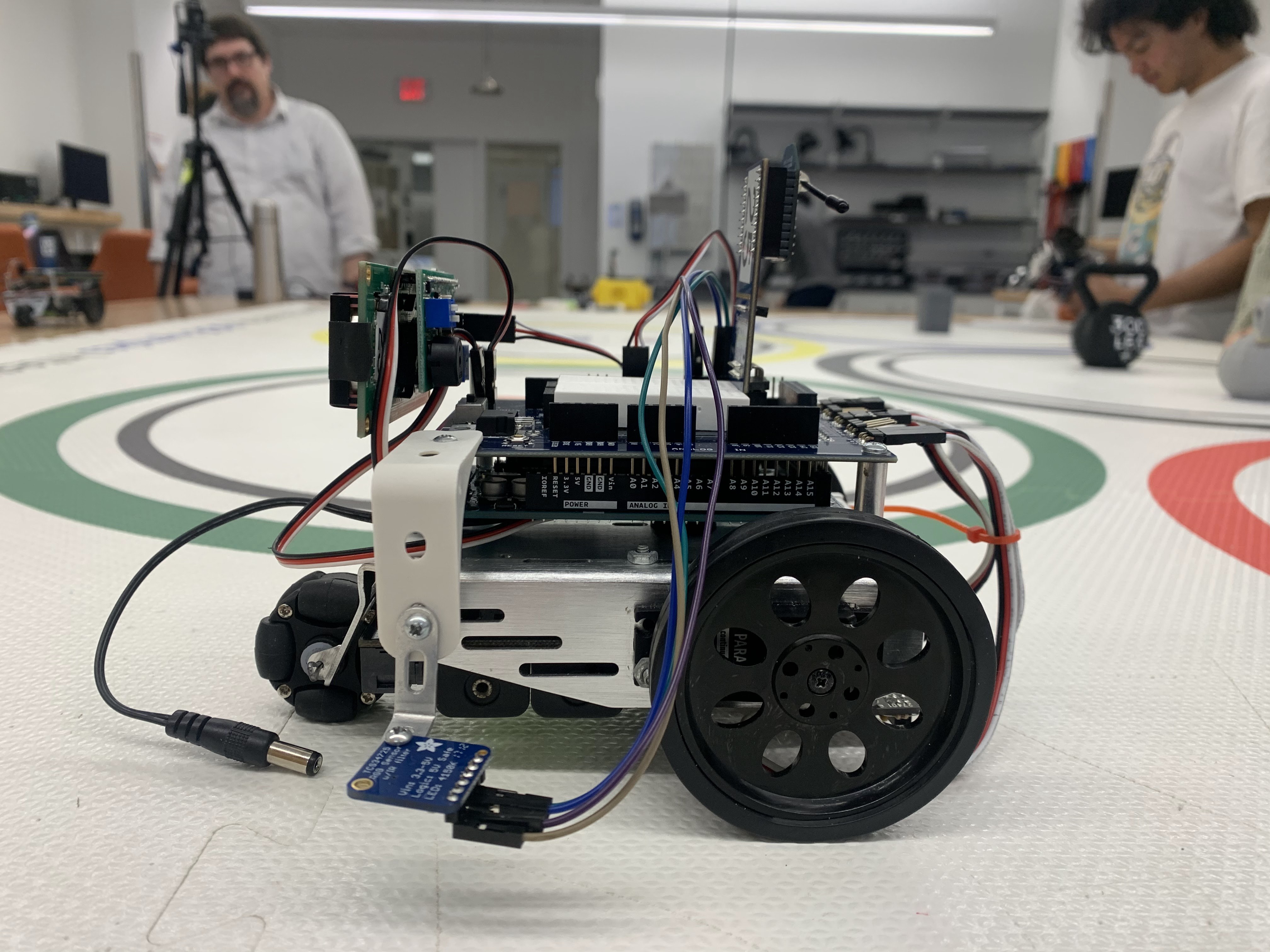
Multi-sensor autonomous robot
Feb 2024 — Apr 2024

Multi-Sensor Autonomous Robot

RoboticsC++Sensors
→
Jira issue dashboard
Jun 2024 — Aug 2024

Jira Ticket Intake & Analytics Dashboard

AutomationJiraData Analysis
→
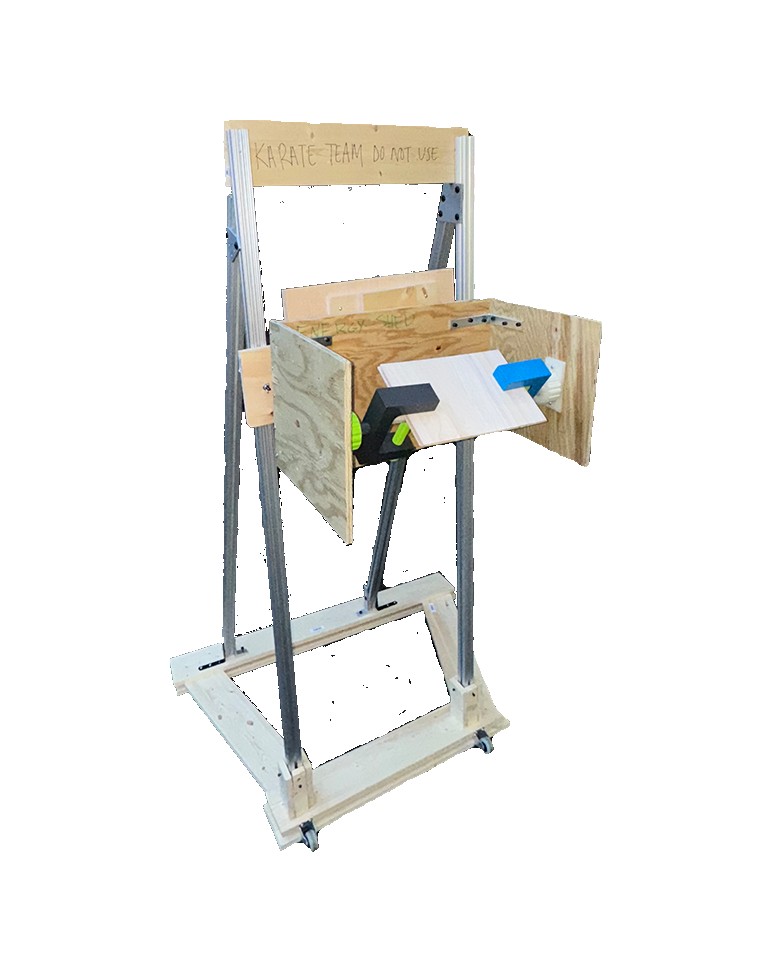
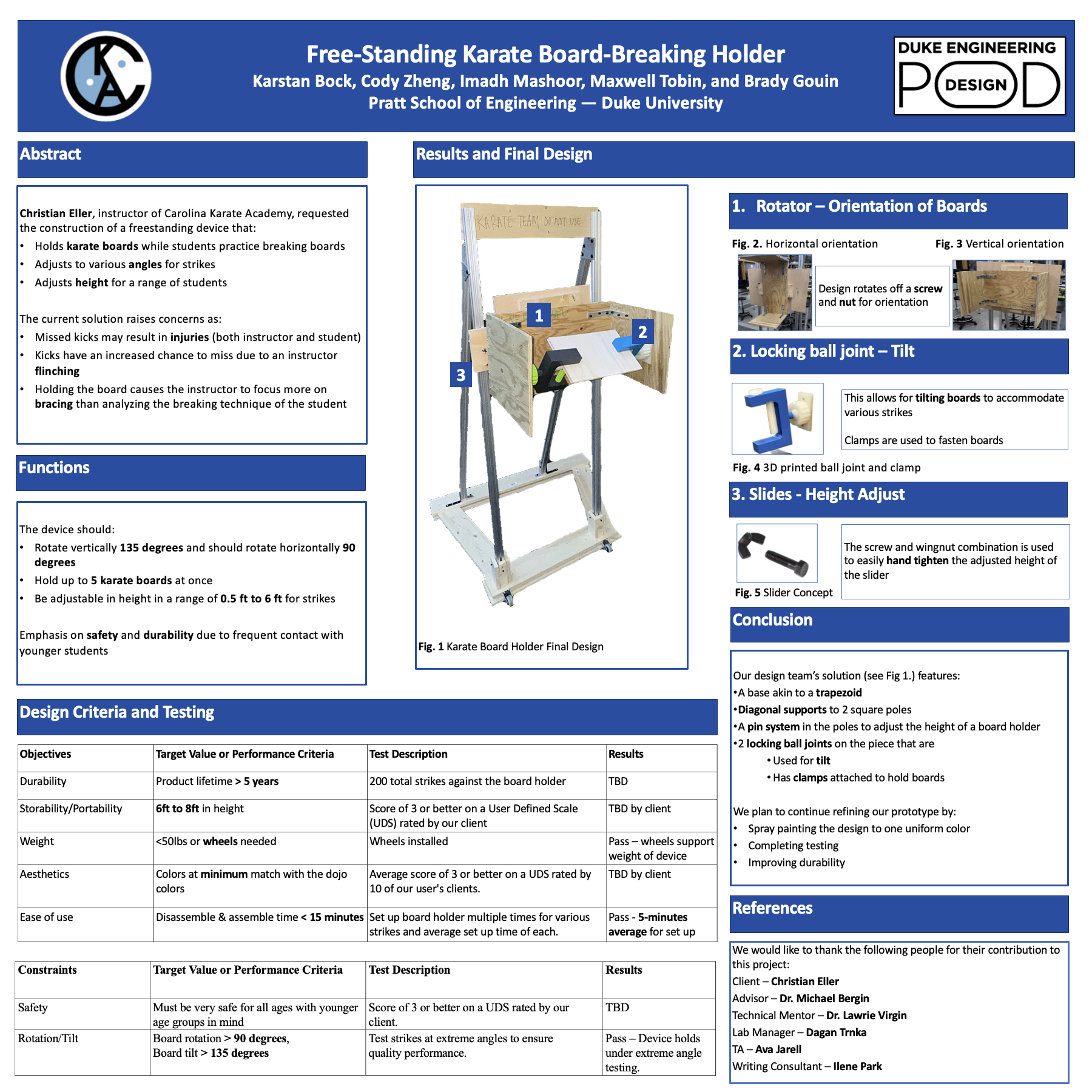
Free-standing karate board-breaking holder
Sep 2023 — Dec 2023

Free-Standing Karate Board-Breaking Holder

MechanicalProduct Design
→
Support portal before and after redesign
Jun 2022 — Aug 2022

Automated Support Triage & Routing

AutomationJiraSystems Design
→

Let's connect.

← Back to all projects
Altium DesignerEmbedded SystemsI2CProduct Design

Hydropod — Portable Hydroelectric Generator

Sep 2026 — Present

Portable energy from moving water. I am designing Hydropod’s electrical architecture and schematic/PCB in Altium Designer.

Overview

Problem

  • Multi-day trips need power for small electronics.
  • Power banks run out; solar depends on sunlight.

Solution

  • Portable turbine harvests moving water and charges a battery.
  • Designed for overnight use, including shaded or cloudy conditions.

Users & use cases

  • Backpackers, campers, paddlers, anglers, and field researchers.
  • Replenish phones, GPS, communicators, lights, and cameras beside camp or during river stops.

Theoretical feasibility

A first-principles estimate asks whether a small turbine could accumulate useful energy over an overnight deployment. This is an assumed operating scenario, not measured Hydropod performance.

Model

A = πD² / 4
ṁ = ρAv
Pwater = ½ṁv² = ½ρAv³
Pelec = ½ρAv³Cpηelec

Cp converts water power to shaft power; ηelec represents losses from the shaft through generation and charging to stored energy.

Assumptions & worked example

D = 0.15 m · v = 1.5 m/s
ρ = 1,000 kg/m³ · Cp = 0.10 · ηelec = 0.70
Constant flow for 8 hours

A ≈ 0.01767 m²
Pelec = ½(1000)(0.01767)(1.5)³(0.10)(0.70)
≈ 2.09 W → 16.7 Wh in 8 h

Power scales with D² and v³ if efficiencies stay fixed. Actual output depends on turbine behavior, generator loading, conversion losses, and battery limits. This is energy before subsequent USB/device-charging losses, not an output rating or guaranteed stored capacity.

Read the full feasibility analysis →

Electrical design

Capture moving water, convert it to DC, and store the energy for small-device charging.

  1. Moving waterEnergy source
  2. TurbineWater → rotation
  3. Brushless generator motorEMAX GB4114 · rotation → 3-phase AC
  4. Full-wave rectifierSix-diode bridge · AC → DC
  5. Input protection & sensingTVS · fuse · filtering · INA226
  6. Buck-boost chargerBQ25690 · manages battery charging
  7. Battery & protection1S Li-ion · stores energy
  8. USB outputPlanned boost + current limit → USB-A
MCU - ATtiny1626Planned MPPT logic · Charger control · Power, voltage & temperature sensing · Brake requests · USB enable & fault monitoring
  • Completed: Schematic architecture for rectification, input protection and monitoring, battery charging and protection, and MCU sensing/control.
  • In progress: Generator braking and USB output circuitry; PCB layout and hardware testing are upcoming.
Rev A electrical architecture, organized by subsystem to show the complete energy path on one sheet. The overvoltage brake and USB output regions are still in development. Click to enlarge.
Open original schematic PDF ↗

Input & rectifier

  • Capture: J1 receives three-phase AC; six diodes form a full-wave bridge.
  • Condition: TVS transient protection, a 3 A fuse, and bulk/high-frequency capacitors condition the rectified rail.
  • Measure: INA226 monitors voltage, current, and power over I2C (0x40).
  • Considerations: Generator voltage varies with speed and load. Bench characterization must establish operating limits and final component values.
Three-phase input, diode bridge, input protection, filtering, and INA226 power monitoring. Click to enlarge.

Buck-boost charger

  • Manage: TI BQ25690 interfaces the rectified source with the system rail and 1S battery; MCU control uses I2C (0x6A).
  • Convert: Buck-boost operation accommodates input above or below battery voltage; an external BATFET is included.
  • Considerations: Charging settings, startup behavior, input limits, and supporting values need datasheet review and hardware verification.
BQ25690 charging architecture, external BATFET, filtering, and charger-connected NTC interface. Click to enlarge.

Battery & protection

  • Store: One off-board Molicel P50B 21700 lithium-ion cell.
  • Protect: BQ29700-family protection IC and dual low-side MOSFETs create a hardware protection path independent of firmware.
  • Considerations: A compact 1S architecture needs conversion for USB power. Protection and disconnect behavior remain untested.
Dedicated battery protection and low-side MOSFET arrangement, with an off-board battery connection. Click to enlarge.

MCU & sensing

  • Control: ATtiny1626-SU, powered from PACK_POS with 100 nF decoupling; shared I2C with 10 kΩ pull-ups.
  • Interface: CHG_CE / CHG_STAT / CHG_INT provide charger enable, status, and interrupt signals; 2×3 UPDI supports programming.
  • Sense: Charger TS and MCU ADC use separate NTC paths on one cable. A GPIO-switched divider reduces idle current; battery measurement uses the planned internal VDD/10 ADC path.
  • Considerations: Thermal protection has a direct charger path. BRAKE_REQ / USB_EN / USB_FLT are reserved; firmware completion is not claimed.
MCU architecture with charger control signals, I2C pull-ups, switched temperature measurement, and programming connection. Click to enlarge.

Overvoltage brake · in development

  • Planned analog comparator and MOSFET braking path, independent of MCU operation.
  • Approximately 26.7 V threshold and 20-second hold are provisional; BRAKE_REQ adds an MCU request.

USB output · in development

  • Planned TPS61022 boost → TPS2553 current-limited switch → USB-A.
  • USB_EN and USB_FLT reserve control and fault interfaces; output capability remains untested.

Next: complete the remaining circuits, characterize the generator, finalize values and schematic review/ERC, then move to PCB layout and subsystem bring-up.

← Back to all projects
ASICFull-CustomCMOSSRAM

Matrix-Multiplication Accelerator with Banked SRAM

Aug 2026 — Present · Duke University Senior Design Project

I’m beginning a full-custom CMOS ASIC design for high-throughput, energy-efficient matrix multiplication in AI/ML workloads. The planned architecture pairs a systolic multiply-accumulate (MAC) array with banked, double-buffered SRAM to overlap data loading with computation and keep the array busy. Starting with a 4×4 INT8 MAC array, the project will explore how memory banking and buffering affect throughput, power, area, and timing.

← Back to all projects
Computer ArchitectureDigital LogicLogisim Evolution

16-Bit Single-Cycle RISC CPU

Mar 2025 — Apr 2025

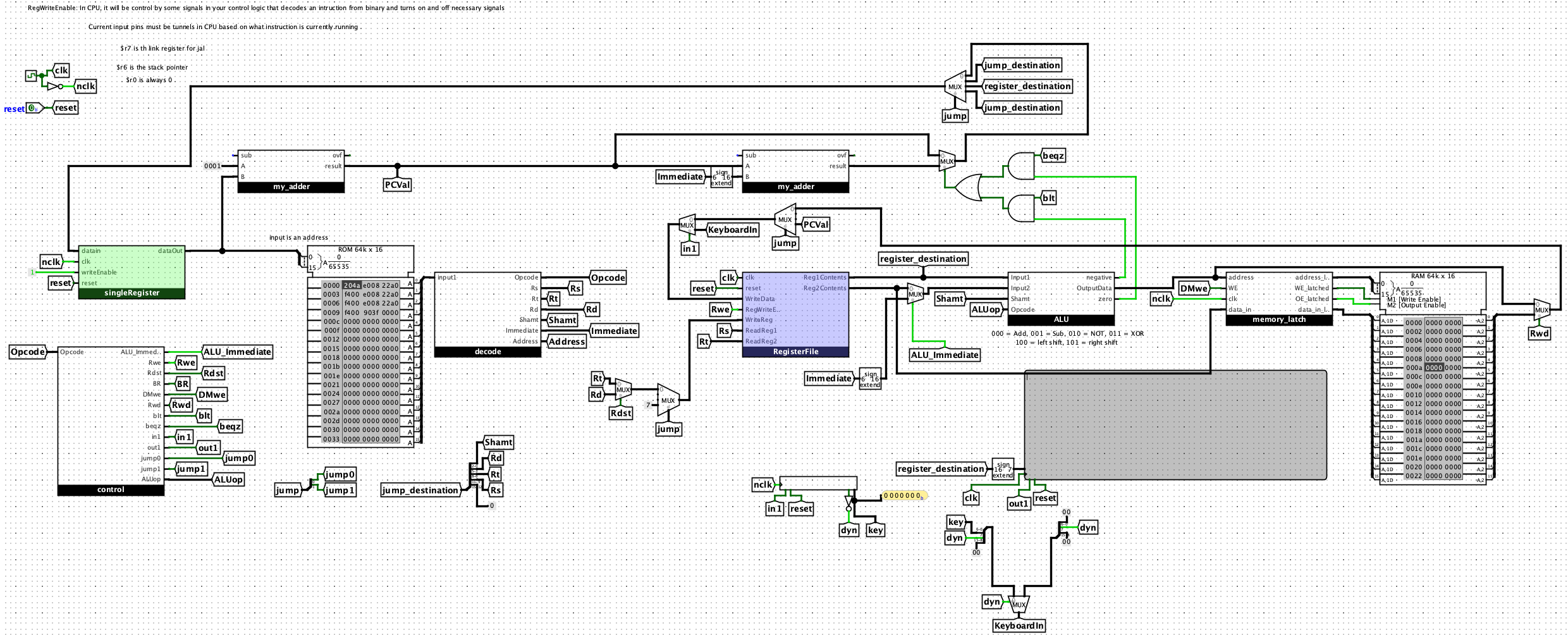
I designed and implemented a 16-bit, single-cycle RISC processor in Logisim Evolution. It executes a 16-instruction MIPS-like instruction set using a custom ALU, a bank of eight 16-bit registers, and control logic that connects memory, branching, function calls, and keyboard/TTY I/O.

Complete processor datapath, from instruction fetch to execution and output. Click to enlarge.

How an instruction moves through the CPU

Each instruction follows these steps within a single cycle.

  1. Fetch

    Read the instruction at the program counter.

  2. Decode & read

    Identify the operation and read the register values it needs.

  3. Execute

    Calculate a result, memory address, or branch condition.

  4. Memory & I/O

    Read or write data memory, or exchange a character with the keyboard or display.

  5. Write back

    Save the result in the destination register when needed.

  6. Next instruction

    Advance the program counter, or select a branch or jump target.

16-instruction ISA

The Duke 250/16 instruction set covers arithmetic, logic, memory, control flow, and character I/O. Each instruction is 16 bits, encoded in one of three formats.

R-type · registers
[15:12] opcode  [11:9] Rs
[8:6] Rt  [5:3] Rd  [2:0] shift
I-type · immediate
[15:12] opcode  [11:9] Rs
[8:6] Rt  [5:0] signed immediate
J-type · jump
[15:12] opcode  [11:0] address

Six-bit immediates are sign-extended to 16 bits. Conditional branches use an offset from PC + 1.

InstructionTypeOperation
addRrd = rs + rt
subRrd = rs - rt
addiIrt = rs + immediate
notRrd = NOT(rs)
xorRrd = rs XOR rt
sllRrd = rs << shamt
srlRrd = rs >> shamt (logical)
lwIrt = Mem[rs + displacement]
swIMem[rs + displacement] = rt
beqzIBranch if rs = 0
bltIBranch if rs < rt
jJJump to address
jrRPC = rs
jalJSave PC + 1 in r7; jump
inputRKeyboard → rd
outputRLow 7 bits of rs → TTY

Arithmetic Logic Unit

The ALU operates on two 16-bit values. A multiplexer selects one of six results: add, subtract, NOT, XOR, logical left shift, or logical right shift.

I combined a custom adder/subtractor with separate logic and shift circuits. Zero detection on the first operand and the subtraction sign bit support conditional branches.

Six operations in one 16-bit ALU. Click to enlarge.

Gate-level adder/subtractor

I built a one-bit full adder, then chained sixteen copies through their carry signals to create a 16-bit ripple-carry adder.

For subtraction, the circuit inverts the second operand and adds one. The same hardware handles both operations and detects signed overflow.

One-bit full adder: sum and carry logic. Click to enlarge.
Sixteen full-adder stages form the ripple-carry adder/subtractor. Click to enlarge.

Registers and register file

Building one 16-bit register

Sixteen D flip-flops each store one bit. Shared write-enable and clock signals control updates; asynchronous reset clears the value.

Single register: sixteen D flip-flops store one 16-bit value. Click to enlarge.
Register file: eight 16-bit registers with two read ports and one write port. Click to enlarge.

Combining eight registers into a register file

The register file is a bank of eight 16-bit registers. Seven use the storage circuit above; r0 is fixed at zero. Two read ports retrieve values simultaneously, while one write port updates a selected register.

Decoders select the register to write and tri-state buffers drive the read buses. Register r7 saves the return address for function calls; r6 is used as a stack pointer by software convention.

Instruction decoding

The decoder splits each 16-bit instruction into its operation code and fields for registers, shift amount, immediate value, or jump address. The control unit then determines how to use those fields.

Separating the instruction into its component fields. Click to enlarge.

Hardwired control unit

A 4-to-16 decoder identifies the instruction. Combinational logic turns it into the signals that select ALU operations, enable register and memory writes, and direct branches, jumps, and I/O.

Opcode-driven control signals configure the datapath. Click to enlarge.

Logical shift hardware

Multiplexer stages shift by 1, 2, and 4 positions, combining to produce any shift from 0 through 7. Both directions fill vacated bits with zero.

Logical shift left

Logical shift right

Memory and system integration

I integrated the memory_latch interface between the datapath and RAM to hold addresses, write data, and enable signals stable during memory access.

Stores take an extra cycle to become visible, so a load cannot immediately follow a store.

Memory interface coordinating address, data, and RAM enables. Click to enlarge.
  • Memory: Separate instruction ROM and data RAM, each addressed in 16-bit words.
  • Control flow: Next-PC logic supports sequential execution, branches, jumps, and function calls.
  • Timing: Coordinated clock edges update state; reset clears registers, the PC, and I/O without changing memory.
  • I/O: Dedicated instructions read nonblocking keyboard input and send characters to the TTY display.
  • Validation: Passed all automated functional tests (130/130 points), including recursive Fibonacci and full Fibonacci and prime-number demos.
← Back to all projects
SemiconductorsNC-FETDevice Physics

Performance and Analysis of Negative-Capacitance FETs

Feb 2026 — Apr 2026

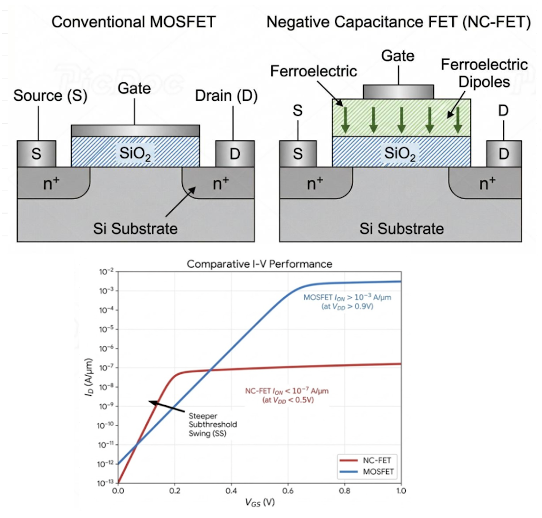
NC-FETs add a ferroelectric gate layer to amplify voltage internally, potentially overcoming conventional MOSFETs’ ~60 mV/dec subthreshold-swing limit at room temperature. We assessed whether experimental and theoretical architectures could support future low-power CMOS logic.

Our work combined literature synthesis, device-physics analysis, and quantitative benchmarking of seven experimental and two theoretical implementations. We compared structure, materials, subthreshold swing, operating voltage, and current performance, then assessed hysteresis, capacitance matching, delay, negative differential resistance (NDR), variability, and manufacturability.

Research Focus

  • Switching: Can ferroelectric amplification beat the ~60 mV/dec limit?
  • Benchmarking: How do structure, ferroelectric material, switching behavior, and operating conditions compare?
  • Tradeoffs: What does lower swing cost, and which materials and architectures suit CMOS integration?
  • Feasibility: What blocks adoption over conventional FinFET and gate-all-around (GAA) logic?

Research Presentation

Explore the device analysis and benchmarks. Use the arrows to navigate or expand to zoom.

Slide 1: Overview and Performance Benchmarking of Negative Capacitance FETs
1 / 15

Overview and Performance Benchmarking of Negative Capacitance FETs

Key Findings

  • Sub-60 mV/dec switching: Ferroelectric voltage amplification enables steep switching, but does not alone establish fast, stable logic.
  • Voltage and current limits: Low swing can require impractical voltages or sacrifice current performance. The reviewed printed device needed 8 V, limiting its use in low-voltage CMOS.
  • Stability: Higher remanent polarization strengthens the ferroelectric response but risks hysteresis. Ferroelectric–dielectric capacitance matching is essential; thickness also affects delay and stability.
  • CMOS integration: HfO₂/HZO may fit existing gate-stack processes. FinFET, GAA, and nanosheet architectures offer promising gate control.
  • Readiness: Conventional silicon FinFET/GAA remains more reliable for logic, with advantages in drive current, stability, process uniformity, and manufacturing maturity.

Engineering Tradeoffs

Relationships identified in the research
Design considerationPotential benefitTradeoff
Higher remanent polarizationStronger NC response and voltage amplificationMore hysteresis and history-dependent switching
Ferroelectric thicknessThicker layers can strengthen NCSlower polarization switching; poor matching risks instability and NDR
Capacitance matchingStable amplification with less hysteresisSensitive to material variation and gate-stack dimensions
HfO₂ / HZO gate stacksPotential fit with existing high-κ CMOS processesRequires precise deposition, annealing, thickness, and material control
FinFET / GAA / nanosheetsBetter gate control; fewer short-channel effectsUniform ferroelectric integration remains difficult at advanced dimensions

Research Paper

Full analysis, benchmarking table, figures, and references. Scroll through six pages and zoom for detail.

Research Presentation
← Back to all projects
FPGAVerilogDigital Design

FPGA 5-Stage Pipelined Processor with Tic-Tac-Toe AI

Jan 2026 — Apr 2026

Technical Report

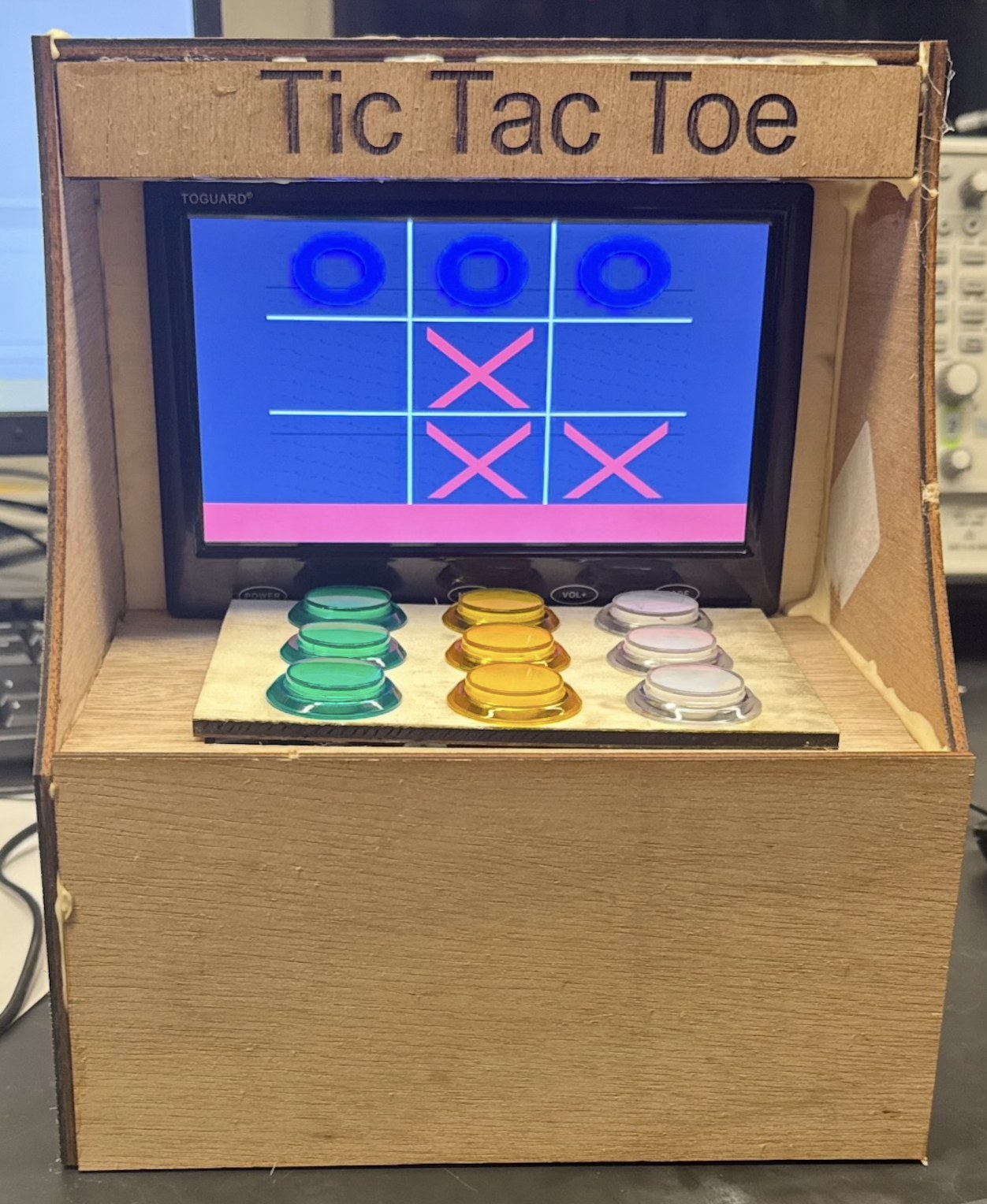
A complete hardware–software system that realizes interactive Tic-Tac-Toe on an FPGA using a custom 5-stage pipelined processor — integrating physical button input, memory-mapped I/O, custom processor instructions, and VGA display output for real-time gameplay between a human and an AI opponent.

System architecture

The system has four primary components: a modified 5-stage pipelined processor that executes both standard and custom instructions, a memory subsystem storing board state and game variables, a physical input interface built from a 3×3 push-button array, and a VGA output system that renders the game in real time. The board lives in data memory addresses 0–8, with memory-mapped registers for input (address 4080 reports which button is pressed) and game status (address 4081 signals a human win, AI win, or draw) — keeping a clean interface between computation and visualization.

Custom instructions

To make board evaluation fast, we extended the processor with two custom R-type instructions. MOVEMASK converts the board state into a compact 9-bit player mask in a single instruction, eliminating the loops and branching that assembly would otherwise need. CHECKWIN takes that mask and evaluates all eight winning configurations in parallel using bitwise operations — constant-time win detection in one cycle. Both integrate into the execute stage using the pipeline's existing forwarding, stalling, and flush mechanisms, so no structural changes were required.

The AI

The AI opponent runs a no-depth-limit minimax algorithm written entirely in assembly: it recursively explores future game states, scoring +10 for an AI win, −10 for a human win, and 0 for a draw, simulating and undoing each candidate move. Because minimax is deeply recursive, correct stack management — saving return addresses and restoring values across nested calls — was essential. The result plays optimally; a human basically can't beat it.

Hardware

The input system is nine push buttons soldered onto a protoboard, each with a ~10 kΩ pull-down resistor to prevent floating inputs, with hot glue for strain relief and zip-tied wiring organized by button group. The VGA controller renders the grid and moves based on board memory. A key design fix: during minimax, intermediate board states were being drawn to the screen, making cells flash X's and O's mid-computation — we decoupled computation from display so only finalized moves render.

Testing

Testing ran iteratively across levels: processor and assembly verification in Vivado simulation (branches, function calls, stack behavior), independent validation of both custom instructions against all eight win patterns, per-button input testing, controlled VGA state checks, and full end-to-end gameplay. Full-system testing surfaced the display glitch and pipeline data hazards with the custom instructions, both resolved through forwarding verification, stall handling, and instruction sequencing.

← Back to all projects
AerospaceMechatronicsAutomationSensorsHIL

Automated Landing Gear Sensing System

May 2025 — Aug 2025 · Honda Flight Test Lab

An automated system that simulates weight-on-wheels sensing for hardware-in-the-loop testing — replacing a manual process where an engineer physically repositioned sensor covers to mimic the plane touching the ground.

The problem

The existing weight-on-wheels setup used proximity sensors with sliding covers: on the ground, a cover blocks the sensor; in the air, the sensor reads through a hole in the slider. To run a test, an engineer had to manually move the sliders into the correct orientation before the readings could feed the real-time simulation system — slow, and easy to get wrong.

Mechanical design

I replaced the manual process with a servo-driven mechanism of my own design, triggered automatically when the X-Plane flight simulator signals wheel touchdown. Converting the servos' rotational motion into the linear motion of the covers meant researching mechanism options independently — no mechanical engineer on the team could guide me — and settling on a slider-crank system. I taught myself CATIA from scratch to model the full assembly with proper functional design and tolerancing, then ordered the hardware and built the complete sheet-metal model.

Electrical design

I controlled the servos with 5V PWM signals from an Arduino, powered all four from an external 5V supply, and used 28V-to-5V DC-DC converters to step the aircraft's 28V signals (from a UEI DNR-433 card) down to a range the Arduino could safely read. I soldered the electronics into a project box, wired the full system, and documented the electrical architecture in Visio for lab implementation.

Impact

The system fully automates weight-on-wheels stimulation, giving the lab hardware-in-the-loop and software-in-the-loop integration testing capability it didn't have before.

← Back to all projects
ControlsElectrical DesignAerospaceSimulinkHIL

Nose Wheel Steering Hardware Simulation

May 2025 — Aug 2025 · Honda Flight Test Lab

A hardware-in-the-loop system replicating the hydraulically controlled nose wheel steering mechanism for Honda's Echelon aircraft — a test capability that didn't exist on the prior model.

The problem

The position of a steering control valve actuator's LVDT rod determines the nose wheel steering angle. To test the system without the aircraft, I needed a linear actuator to drive that rod — but the actuator I had moved too slowly for the real-time simulation system to faithfully mimic the real hardware.

Mechanical design

I designed a lever-and-fulcrum mechanism in CATIA that doubled the actuator's effective speed: a clevis joint as the fulcrum, with the effort arm half the length of the load arm. I designed rod ends and clevis joints to translate forces cleanly between the actuator and LVDT rod, plus custom clamps to secure everything to the lab's test rack — then 3D printed all of it.

Electrical & controls

The actuator ran on 12V with direction controlled by polarity, so I used a DPDT switch for direction and an SPDT switch for power, both driven by a Pickering 40-584 switch matrix card applying 28V to the coils. I added a linear potentiometer to read rod position, charted its voltage-position relationship, and routed the signal through a dSPACE card. Finally, I built a feedback control loop in Simulink with a PID controller to manage movement and correct for overshoot, and documented the full electrical design for lab implementation.

Impact

The system gave the team its first hardware-in-the-loop test capability for nose wheel steering on the Echelon — a larger, more complex aircraft than the original model — enabling testing of individual parts and the full steering system.

← Back to all projects
CATIA3D PrintingCost Optimization

Cockpit Panel Design

May 2025 — Aug 2025 · Honda Flight Test Lab

Adapting cockpit closeout panels for an aircraft that wasn't in production yet — and delivering a $60,000 project for $16,327.53.

Overview

The facility's operations manager asked me to take this on after noticing my CATIA work on other projects. The newer Echelon aircraft's cockpit wasn't in production yet, so its interior closeout panels had to be adapted to fit the older aircraft frame used in the test facility.

What I did

I used a range of CATIA methods to parse, solidify, and join the design files — cleaning them up so they could be printed efficiently and within the constraints of the lab's available 3D printer.

Impact

The project had a $60,000 budget. I completed it for $16,327.53, saving roughly $43,700.

← Back to all projects
SchematicsIntegrationCATIA

External Lighting Visualization Panel

May 2025 — Aug 2025 · Honda Flight Test Lab

A physical testing panel that gives engineers and pilots a hands-on reference for how the aircraft's external lighting system actually behaves.

Overview

I designed and built a testing panel to visualize the aircraft's external lighting system — including the physical enclosure, light mounts, and connector cutouts, drilling and cutting the D-sub openings myself.

What I built

I first simplified the original electrical design down to exactly which lights were needed, what signals drove each one, and how they mapped to D-sub connectors — cutting unnecessary complexity out of the wiring. Then I used CATIA's Aerospace Sheet Metal Design tools to create custom clamps mounting the lights on the railings visible from inside the Echelon test facility cockpit.

Impact

Engineers and pilots in the test facility can now see the lighting system respond in real time, instead of reasoning about it from electrical drawings.

← Back to all projects
AutomationJiraData Analysis

Jira Ticket Intake & Analytics Dashboard

Jun 2024 — Aug 2024 · Buyers Edge Platform

A ground-up rebuild of a client support intake system used by restaurant account managers — turning four vague request categories into a structured, self-routing system with real-time trend dashboards.

Jira issue dashboard

The problem

Managing the support request queue day-to-day, I saw the same failure repeatedly: the intake form had only four broad request types, so tickets arrived vague, mis-categorized, and missing the information needed to solve them. Every ticket meant back-and-forth with the requestor and manual detective work across portal dashboards, Salesforce, and internal databases. I also helped work down a 170-ticket bug backlog, resolving about a third of the tickets myself.

The redesign

I rebuilt the intake form from the ground up with specific request types — account merges, brand updates, hierarchy changes, deletions, and categorized bug reports by product area — each backed by a Jira form with conditional logic that prompts the requestor for exactly the information needed to solve that issue. The goal: tickets arrive pre-categorized and complete, eliminating most requestor follow-up. I layered in automations that auto-assign each request type to the right owner and keep categorization fields consistent for reporting.

The dashboard

Jira doesn't filter well by request type, so I designed a workaround: hidden fields with default values per request type that filters could key on. Using JQL, I built dashboards tracking ticket trends by type and by day, so the QA team could spot recurring issues and act proactively instead of reactively. I also re-categorized the historical backlog so the trend data was accurate from day one.

Making it stick

I gathered feedback from the account managers using the new form and shipped quick fixes, then wrote a step-by-step SOP documenting how to build and maintain future request types, forms, automations, filters, and dashboards — so the system could scale without me.

← Back to all projects
RoboticsC++Sensors

Multi-Sensor Autonomous Robot

Feb 2024 — Apr 2024 · Duke University

An Arduino-based autonomous robot that navigates, senses its environment through six different sensor types, and coordinates wirelessly with teammate robots in real time.

Multi-sensor autonomous robot

Overview

I developed and programmed the bot on an Arduino in C++ to autonomously complete a series of challenges without human input — path navigation, environmental sensing, object identification, and team-based coordination tasks.

Navigation & sensing

QTI sensors handled line-following for path navigation, while PING))) ultrasonic sensors measured distances to detect obstacles. A thermal IR sensor measured temperature, an RGB color sensor identified objects by color, and a Hall Effect sensor detected magnetic polarity — giving the bot a full picture of its environment across five different sensing modalities.

Identification & feedback

An integrated RFID reader scanned tags for identification tasks, an onboard LED signaled status updates, and a 4×20 LCD display output sensor readings and state in real time — so the bot's decision-making was visible as it worked.

Team coordination

For team-based challenges, XBee wireless modules enabled communication and coordination with other bots — sharing state and dividing up tasks in real time as each challenge unfolded.

← Back to all projects
MechanicalProduct Design

Free-Standing Karate Board-Breaking Holder

Sep 2023 — Dec 2023 · Duke University

A client-commissioned device that holds breaking boards during student strikes — removing the injury risk of an instructor bracing boards by hand.

Free-standing karate board-breaking holder

The client

A local karate academy instructor needed a way to hold breaking boards during student strikes without physically bracing them himself. His original method created injury risk for both students and himself, and pulled his focus away from coaching technique.

What I did

Working on a 5-person engineering design team, I led testing and validation against our design specifications — running repeated strikes to confirm the device handled over 90 degrees of horizontal rotation and 135 degrees of tilt under real impact, and timing assembly and disassembly to validate our under-5-minute setup target. I also contributed key mechanical elements, including the locking ball joint that lets boards tilt to match different strike angles, and worked with teammates on the height-adjustable slider accommodating students from 0.5 to 6 feet.

Outcome

A free-standing device the instructor can set up in minutes, letting him coach technique while the hardware takes the hits.

← Back to all projects
AutomationJiraSystems Design

Automated Support Triage & Routing

Jun 2022 — Aug 2022 · Buyers Edge Platform

A new Jira project — which I built and led — that automatically routed internal support requests to the person who could actually solve them, eliminating manual triage.

Redesigned support portal home page

The problem

Before this, every incoming ticket required someone to manually figure out what the problem was, chase down details from the requestor, and hand it to the right person. My job was diagnosing those issues — which meant learning the company's data model (purchase agreements, distributor and merchant identifiers, portal databases) and cross-referencing records across databases to find duplicate accounts, misaligned data, and bugs.

What I built

I created and led a new, improved Jira project with automations that classified incoming issue types and routed each one directly to the correct owner, with the information needed to solve it attached. This eliminated manual input and cut resolution time across the product development team's internal queue.

Also that summer

I authored a company-wide SOP for expense reporting and managed expense reports for key executives.

Circuit detail